


Pasi të jeni regjistruar në Blogger, ju do të shihni një listë ne 'Dashboard' ku ndodhet blogu juaj. Nese keni hapur me te njejten adrese Gmail me shume se nje blog, do ti shikoni te gjithe aty te renditur.
Per te shkruajtur nje artikull te ri veproni si ne vazhdim:
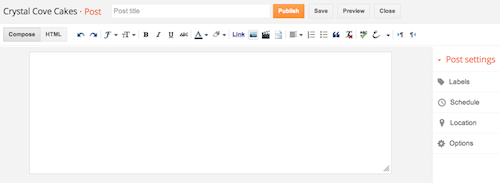
1- Klikoni tek ikona portokalli me nje laps per te hapur nje faqe te re shkrimi.
2- Ketu mund te shkruani titullin (Post Title) dhe tekstin ne kuadratin e madh poshte.
3- Teksti mund te modifikohet ne font, madhesi, ngjyra me ane te butonave qe jane ne dispozicion ne rreshtin siper.
Kur te perfundoni se shkruajtur tekstin, klikoni ne butonin Preview, per te pare se si do duket artikulli juaj nje here qe eshte publikuar. Mbasi e keni rilexuar dhe keni vendosur qe eshte gati, klikoni butonin Publish dhe artikulli publikohet online.


AN ODE TO DETAIL: TRANSFORMING MY APARTMENT WITH ORAC
-
There is something deeply intimate about redesigning your own space — a
process that reflects not only your aesthetic evolution but also your
emotional o...


